How Does Anki Work: Learning How to Study Flashcards
You’re probably wondering how does Anki work in more detail and how to study your Speakada flashcards. All of this is important so that you can tap into the full potential of your Speakada flashcards and Anki.
How Does Anki Work and How to Study my Speakada Flashcards on Anki?
If you have installed Anki and synced your devices using AnkiWeb, you are now ready to start learning using your Speakada flashcards.
Please make sure you have also installed your Speakada flashcards as this is a separate step you’ll need to do.
Understanding the Decks Screen
To begin learning, you’ll need to open Anki. The first thing you’ll see is the decks screen. This displays the list of decks you have. If you have purchased more than one deck from us or if you are learning more than one language, you will see all available decks on the decks screen.

On the decks screen you’ll also notice two columns. The first is ‘due’, which are the number of cards that you have studied before and are waiting to be reviewed so you don’t forget them. The second column is ‘new’, the number of new cards that you have never studied before and are ready to be learnt.
Select the deck you would like to study and click “Study Now” to begin learning.
Anki will load the selected deck and show you the first flashcard. Anki will continue to show cards until there are no more pending cards. You can return to the decks screen any time by clicking on “Decks” located at the top of the main window or by pressing the “s” key on your keyboard.
How to Study Flashcards
When a card is shown, you’ll only see the question or the front of the card. The purpose of this is to assess whether you know the answer. If you want to hear the audio again, you can click the “r” button to playback the audio. Click “Show Answer” or the spacebar to reveal the answer. This is when you can compare your answer to the back of the card.
After reviewing the answer, you then need to rate your answer to one of the following four options:
-
“Again” (Keyboard shortcut “1”). Click this option if you got the answer incorrect or you could not recall the answer at all. The general rule is if you are unable to answer within 10 seconds of the card appearing, you probably do not know the answer well enough and need to review the card more often.
-
Anki will place this card to be reviewed more often to help you recall the answer better’.Hard” (Keyboard shortcut “2”). Click this option if you found it difficult to recall the answer. This will signal Anki to show the card more often in the future.
-
“Good” (Keyboard shortcut “3” or spacebar). Click this option if you got the answer correct but it was not easy for you to recall. This will place the card into review, where you will see the card again the next day.
-
“Easy” (Keyboard shortcut “4”). Click this option if you knew the answer immediately and found it too easy. This will prompt Anki to show you the card again 4 days later and then at increasing intervals until you no longer need to study the card.

When you are done reviewing your cards for a certain deck for the day, you’ll be shown this “Congratulations” message in Anki:

This message means that you’ve finished all the flashcards of that deck for today. You can wait until tomorrow to show you more flashcards that are due for that deck.
In the meanwhile, you can go back to the decks screen where you can select another deck to study or close Anki to sync your progress via AnkiWeb and on your other devices.
It is up to use how you choose to study your Speakada flashcards. You can keep your decks separated and review cards by each flashcard deck. For example, review your Pronunciation flashcards first, then move on to Vocabulary flashcards next, and your Grammar flashcards afterwards.
What to do if a card is too easy? What Happens if I no longer want to learn a particular card?
As you study your Anki flashcards, you may discover that some flashcards you have are so easy that they’re not worth studying any more. That’s totally fine, and actually quite normal.
In fact, with our Speakada flashcards, we understand that there may be certain pronunciation, vocabulary or grammar flashcards that you have already mastered. Of course, it would be impossible for us to know all the exact sounds, words, and grammar that each individual learner is having trouble with. We don’t want to assume the exact level of each learner. So, that’s why we included all of the most important language features in our Pronunciation, Vocabulary and Grammar decks.
Nevertheless, in your personal situation, you can still get a lot of value from our Speakada flashcards by just focusing on the sounds, words and grammar that are very difficult for you personally.
Anki actually has a “Suspend” feature, and a “Delete” feature, as well as the “Easy” button feature. These 3 features are 3 ways that you can deal with very easy cards, or cards that you want to skip.
So, if you want to make the most of our Speakada Anki decks, and just focus on the hardest sounds, words and grammar for you personally, then all you need to do is Suspend or Delete the very easy cards.
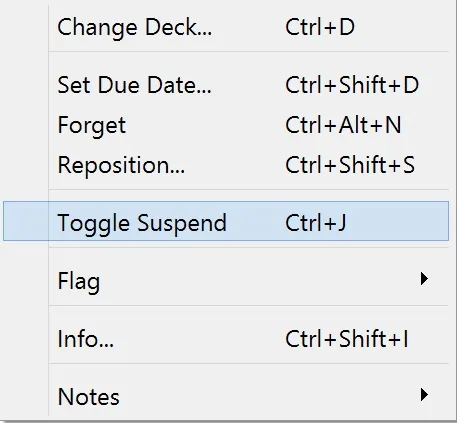
Toggle Suspend in Anki Browser
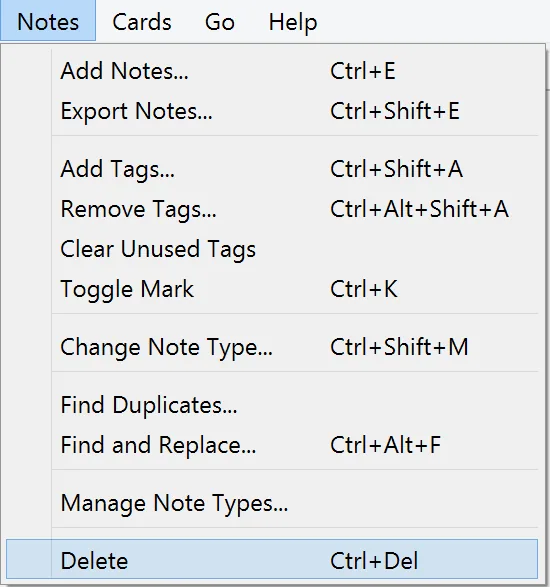
Delete in Anki Browser
You can also select “Easy”. If you do this, then you will mainly see the cards that are the most relevant for you, while foregoing the very simple ones for your personal case.

Easy Button
That’s the benefit of our decks and Anki. You actually have more control of the decks, by being able to just focus on what’s more relevant for you.